Tuesday, December 30, 2014

Time problem in LG G watch after updated to 5.0.1 Android version

Problem

I use my LG G watch with Nexus 5. It worked fine without any issues. Issue started after I updated my watch to Android 5.0.1. The issue was my watch time is one hour less of my phone. For example, If the time in my phone is 6:00 AM then my watch shows 5:00 AM.

Solution

I solved the issue by following below step.

Re-install Android Wear, reset your LG G watch, reconnect using Bluetooth, then reconnect again using Android Wear. After doing this my problem get solved.

The Android KitKat (phone's OS) will connect directly via Android Wear, now you first have to connect using Bluetooth or it will not be detected.

After reset the watch, how do I connect it using Bluetooth without pairing via Android Wear first?

Open Setting -> Blutooth -> Search Device -> Pair your LG G watch

How to stop company pop up messages in Moto E?

Problem:

Moto E is showing up pop up messages with title as Dive in if you use DoCoMo or with some other title for other service provider. You may get something like below image.

Solution:

This pop-up message appears when the flash message is turned on. You can turn it off from SIM tool kit. You will find SIM tool kit which is SIM card icon in App drawer. Launch the SIM card icon app and there you will find flash message. Click on Activate and followed by deactivate. 

Several users reported that they are not able to deactivate. Try to find out flash message and deactivate it. It should look something like below image. 

Source imobileAndroid

Friday, December 26, 2014

BlackBerry Z3 has better e-mail and browser than Android

I have been using BlackBerry Z3 for past one month. Before purchasing this phone I had second thought. This is the only mobile BlackBerry launched officially for affordable price. I haven't used any BlackBerry device before and I was planning to get one in recent years. I suddenly decided lets try BlackBerry this time after using several Android devices and one Windows phone. Below is my experience.

No need for Social networking, E-mail and Chat apps:

Within few days I learn there is no need for apps related to communication. BlackBerry has it own app named as 'Hub' where you can see all you chats, email, calls, tweets, feeds etc. Hub is not an app but it is part of OS. Like home screen in Android this Hub will be always present. It is simple and straightforward and you no need to of manual to get used to it.

The Hub is always ON and you no need to launch it separately. Once you connect to internet you will be automatically receiving all your messages there. Only limitation in Hub is you cannot integrate all apps with it. Only selected and popular apps like Facebook, WhatsApp and Twitter is integrated.

 The Hub automatically formats the text in single column view and there is no need of zoom in and zoom out. In Android I face this difficulty in Email app. The Email synchronization is very slow in Android plus you need to zoom in and zoom out to view the message which is annoying particularly in small screen phone.


Browser

The BlackBerry browser supports Flash and you can play any online videos. Google recently stopped flash player support in Chrome browser for Android.  I was not able to watch TV series from several websites using my mobile. Google Chrome is my favorite browser in desktop but not in mobile. I didn't feel good browsing experience in Google Chrome for Android. Opera Mini was my favorite browser in Android since it consumes less RAM as well as good page loading speed.

BlackBerry browser has very good features like reading mode which I like most. After webpage gets loaded you can choose reading mode from menu which will shows you a e-book kind of interface. It works well for reading news and article.

APK support - Best move by BlackBerry

APK is the extension used in Android app and those files can be installed in BlackBerry. I would say it is best move BlackBerry. Running Android app in BlackBerry is smooth than running in mid-end Android device. I was surprised by the app performance in BlackBerry. You won't feel any sluggish. It take few seconds (10 - 20 seconds) to launch but once launched it works fine.

Missing Google Now

Only field BlackBerry should improve is their voice integration. Google Now will convert your voice to text on the go. But BlackBerry Voice control is not up to the mark it takes lot of time to recognize. I am using BlackBerry 10.2.X OS. It seems there is new version voice control in 10.3.X OS. BlackBerry need to improve their voice control or integrate Google Now voice control with their browser at least.

Saturday, December 20, 2014

How to install Play Store in Xiaomi Redmi 1S if deleted accidently?

Issue:

While cleaning up space in my mobile I accidentally uninstalled the Play Store in Xiaomi Redmi 1S. So how to restore it?

Solution:

You cannot simply download Play Store apk and install i to work. You need to flash the GAPPS (Google Apps). You can download it from below link.

Link - http://rom.mk/gapps

Open the link in new tab to download. It will download ZIP file.

Steps to flash Gapps

  1. Download the ZIP file and place it in your memory card.
  2. Reboot to recovery mode. Press Volume + and power button same time to reboot to recovery mode. 
  3. There you will find install ZIP file from SDcard option. Clicking on it will show the gapps ZIP file. 
  4. You can navigate in the screen volume+ and volume- and power button to OK. Press power button on the ZIP file to install Play Store.
Warning: Only follow the steps if you are familiar with flashing ROM. It may lead to brick your phone. The steps are easy but I advice to take you proper backup and install CWM recovery. 

How to remove lock symbol in recent apps Xiaomi RedMi 1S?

Issue:

When trying to clear RAM space in Redmi 1S there are times you will see lock symbol in the app. It looks like below image.

Here you can see there is lock symbol in my Camera app.

Solution:

Lock symbol denotes that it will not be cleared when tapping the clear button (the brush icon). To remove the lock symbol just swipe down the app. In my case I will just swipe down the camera app to remove the lock symbol.

Monday, December 8, 2014

Can't install music app error code 80070127 in Windows Phone- Solution

Issue:
Can't install music app, it downloads fully but while installation it says error. Below is screenshot of the error

Solution: 
There are few solutions I found in forums. The sucess rate for all these solution is very less. I followed the below solution to get rid of this issue.


Try this:
I set my data sense to unlimited and it did the magic. Then I was able to install the Music app.

Or this:
I found this in Microsoft forum. Unpin all the Music tiles from start screen and kids corner. Some users reported that after following this they are able to fix the issue. I didn't worked for me.

If you have any working solution feel free to share.

Tuesday, November 25, 2014

Can't create Nokia account - Network Problem error

Issue: 

When I try to create Nokia account in my Lumia phone it shows following error.

 Network Problem. We couldn't complete that operation. Please try again later. Below I have added the screen shot of this error. I tried to create account many time using 3G as well as Wi-Fi but no luck.

 Solution: 

In this case Register with your PC/laptop. When done, setup account in your device. 

Open settings>>E-mail&Account>>Add an Account.

 https://account.nokia.com/acct/account/index.html


Wednesday, October 1, 2014

Found a way to move game data to SDCard in Redmi 1S

I presume this tutorial won't make sense to those who didn't flashed their Redmi 1S with custom ROM (Cyanogenmod 11 aka CM 11, Mokee ROM)

Note:  It will not work on MIUI V5 [Jellybean] because its only for KitKat [4.4.x]

Pre-request:


  • Should have installed TWRP or CMW recovery.
  • Should have flashed CM11 or Mokee ROM
  • Need to install Xposed installer from Play Store or other possible ways.

Here is how to move game's obb file to sdcard 


  • Install CM11 or Mokee Rom.
  • Install Xposed installer.
  • Open it and install its framework.
  • Go to downloads in Xposed installer.
  • Search for Kitkat full SD card access & obb on SD.
  • Download them.
  • Install them.
  • Open modules in Xposed installer.
  • Activate both modules.
  • Reboot.
Do it at your own risk. Installing Xposed framework may lead to soft brick. If you have backup of your ROM then no worries. 

After Reboot you are done. Now you can copy OBB of games to SDCard as in below image. 

Moved my game OBB file after successful install

Modules To Be Installed On Xposed

Sunday, September 28, 2014

Will installing CM 11 in Redmi 1S reduce heat and RAM problem?

I flashed my Redmi 1S with Cyanogenmod 11 aka CM11. Here are screenshots of CM 11 running in Redmi 1S from which you can see the improvements.

Android KitKat:

From the below image you can see the Android version as 4.4.4. It is nothing but Android Kitkat. Model number is shown as HM which is another name of Redmi (Hongami). This phone is know as Hongami in China. As it runs Android KitKat you can experience the same smoothness of Android KitKat. The UI is fluid smooth and I can see improvements in battery backup. Before I was able to maintain 6 hrs backup with continuous usage (Wi-Fi + Videos Playback) which is now raised to 8 and half hours. 


RAM improvement:

Rooted version of MIUI (old version) will maintain 323 MB free RAM space without running any apps. The below image shows it is improved to 493 MB which is nearly 200 MB extra free RAM space. 

Default RAM is used by system apps and system related services. Here CM 11 uses 381 MB which seems to be reasonable.  

Improvements in heating issue:

My phone usually gets heated when I watch videos using MX Player. Which I checked in the previous version the temperature was 42 to 48 degree Celsius. From the below image you can see that it is 36.3 degree Celsius. It is way too improvement. Even this 36.3 degree C is recorded while I was watching video in MX player. 
You can flash this ROM if you really feel frustrated with heating and lagging issues. You can find the instructions to flash the ROM is XDA-Developer.

Saturday, September 20, 2014

My RedMi 1S is heating how to minimize it?

I have Redmi 1S. It gets heated up when connected to internet and multi-tasking. It is clear that the issue was related to software that runs background all the time. So I made an attempt to install ROM to check whether the heating issue can be solved. Yes, we can, the fix is Mooke ROM (based on CynogenMod 11).

So here I am not going to give the guide to install since a friend of mine installed it in his phone. Here I will give the improvements seen after installing the ROM.


  • Display is so good.
  • Touch response is very smooth.
  • Sound quality was good not much high not much low.
  • Battery Backup 4hrs+ onscreen usage.
  • Camera its Google camera working good and best (i didn't try all modes in camera)
  • RAM: I can always see 450-500mb RAM free and after running decent amount of apps (4 to 6) 200-250 MB free ram.
  • You can use Rebooter app to get 500-580mb free RAM after bootup.


Gaming:

  • Games like Asphalt 8, Gangstar Vegas, Amazing Spiderman, Mc4 working without any lag.
  • CM11 themes and apps are working. 
  • Checked data working on both SIM 


Bugs

  • While installing apps if we change it to save apps in external storage then app not installing.
  • Minor Bugs will be there


DIDN'T FACED ANY HEATING ISSUES until now.

Sunday, September 14, 2014

Games for RedMi 1S running smoothly

Many games are compatible with Xiaomi Redmi 1S. As expected phone gets heated after continuous playing. Lets just forget the fact about heating. I had tried many games surprisingly they run very smoothly. I felt like I am using mini-computer. There are some games which lags a lot but compatible. So first I share you the list of games that is running smoothly in my RedMi 1S phone. 

Games to must install in Redmi 1S

  • Frontline Commando 2
  • Frontline Commando D-Day
  • Modern Combat 4 and Modern Combat 5
  • Dead Trigger 2
  • Temple Run 2
  • Subway Surf
  • Vector 
  • Deer Hunter 2
  • NFS Most Wanted
  • Asphalt 8
  • Injustice
  • Real Football 12
  • Real Racing 3
  • The Amazing Spiderman 2
  • GTA Vice City
  • Manuganu 1 and Manuganu 2
Note: NFS Most Wanted lags if you won't create SWAP memory in your phone. SWAP acts like a RAM (slow-RAM) but the maximum size of SWAP memory in RedMi 1S can be 2 GB. 

Don't install games

I tried GTA San Andres. It is lagging a lot even in medium graphics. Don't install this game. 

Tuesday, September 2, 2014

Redmi 1S showed 'Out of stock' at 2 PM instead of 'Buy Now'

I thought of buying Xiaomi Redmi 1 S and I waited for an hour till the countdown goes 00:00:00. After split second what I saw is the below image.

I was not even blessed to see 'Buy Now' option in the sale page. Congrats for all who bought Xiaomi Redmi 1S.

Update: My girlfriend ordered it for me. :-):-)

Wednesday, August 27, 2014

I want to buy Xiaomi Redmi 1S in Flipkart, share me some tips

Flipkart is going to launch new model from Xiaomi on September 2 at 2 PM. It is the priced at Rs.5,999, a offer you can't deny. So we can't expect more traffic for this mobile than Xiaomi Mi 3. 

If you haven't heard about this mobile let me tell you how the sales happen. If you are planning to buy this mobile, first you need to register in Flipkart. You will find the time and sale date in the same registration page. So you need to login on the mentioned date and exact time to buy the mobile. On previous sale the mobile went out of stock in 2 seconds. Yes, you are reading correctly it is 2 seconds. 

So here is my tip to improve the chances of getting the mobile. 

Save address and your debit/credit card detail before proceeding to purchase

In your Flipkart account you have option to save address and card details. If you feel insecure to save card details then delete the card detail once the purchase is made. 

You can edit your account details from the top right corner. 

This is how Flipkart website works

There will be some procedure in all websites to order and buy a product. If you know the process you can make order faster. In the below image you can find the flow. 

Step 1:


Step 2:

Step 3:

You can save this details in Account -> Settings -> Addresses. If you have saved the address will appear automatically and you no need to enter. 

Step 4:


Step 5:


If you follow the above steps chances of obtaining mobile is greater provided if you have good internet connectivity. Just do as the above image. Don't waste your time by thinking what to do next. If you saved address and card details you can purchase it by just after 4 clicks. 

Monday, August 25, 2014

This is how Windows Phone looks with Android theme

I found a customization tool for Windows Phone 'Cool Tiles' and is really cool. With this app you can customize in many different ways. Here are some of the screenshots of my phone.


The above images are screenshot of my phone, done using 'Cool Tile' apps. It took me few hours to figure out how this app work. But after learning about this app I found it very cool. This is a free app and below is the link to download.

Cool Tile XAP file 

I found it more fun using this app. Few people in WP store commented as frustrating because you need to be patient to make your home screen look cool. If you have good imagination you can make it more cool.

App compatiblity

OS - Windows Phone 8 and Windows Phone 8.1
Price - Free
Publisher name -Studio 8
RAM needed - 512 MB 
Storage needed - File size is 6 MB and occupies 30 MB after installaing

Sunday, August 24, 2014

I want to disable WordPress plugin using phpMyAdmin, How to do that?

It is good to disable WordPress plugin. After updating the plugins it may cause issues. Many users will have more plugin and your task become tedious. I have given tips in this article that will save your time.

First login in phpMyAdmin. Open your hosting account and run the software.


Choose Database in the left menu and select table as shown in below image.

You need to select wp_options. The word wp_ may change because it depends on the lodging table prefix. After selecting wp_options click on 'View' at top of the window. There you can find as active_plugins. If you are not able to find refer the below image.
On the same line you will find 'Edit' button. Click on the edit button to view the contents. It will display the contents of the cell. These contents are nothing but the active plugins of your WordPress blog. Now copy all the contents in a text file and store in your computer. Then select all the text and press delete. After you delete the contents press 'Execute' button in the left-bottom. Now all your active plugins get deactivated.

To re-activate follow the same procedure and copy the contents of text file to the active_plugins cell. Then press run to which will activate the plugin again.


My Nokia Lumia 720 screen got damaged, what will be the cost to replace?

My Nokia Lumia 720 screen is damaged. I went to Nokia care to change my screen. I asked about the price. The cost he told is Rs.7100. I told him my touch is working fine and I need only the screen. But he told the whole thing come as a set and it will cost Rs.7100. I was suspicious about the price first and to confirm it I approached online forums. One guy replied that he changed it for Rs.7500.

Then I approached to local shops. They quoted Rs.1500 to Rs.2500. It seems relatively cheap from the original. I heard that the duplicate touch is not as good as original. I already have experience with duplicate touch screen which I friend replaced in Lumia 520. The touch was not very responsive like the original. However you can manage using it.

I was now using my Android phone. I was not ready to pay either RS.7500 or RS.2500 just for screen. I think instead I can buy new phone and going to use Lumia 720 as a external drive.

Do I need to buy power bank based on my battery?

It is not necessary that power bank mAh should be higher than your phone's mAh. Suppose your phone's battery has 1500 mAh and you can buy 1200 mAh. This power bank (1200 mAh) can charge 50 to 75 percent of your battery (1500 mAh). The mAh is unit used to measure the battery power.

How many times I can charge my phone using power bank?

Suppose if your battery charge goes down to 0 percent and your are using power bank to charge your battery, if the can use power bank has more mAh it can able to deliver two to three of charge to your phone. It cannot be calculated exactly. But I found a formula in Facebook to calculate the how many times power bank can charge battery.

It is,

Real Capacity * Conversion Rate * Phone Battery Health / 1500

Where,
Conversion Rate is remaining percentage in your battery.
Phone battery health is draining rate in your phone.

Saturday, August 23, 2014

Flash player APK download for Motorola G: all Android Kitkat

By default Android 4.4 aka KitKat unfortunately does not support Flash Player. This flash player  is very useful for browsing the web. You will be able to see special moving images (gif) in your phone only if the phone comes with flash player. Latest websites use more flash content without it the browsing experience in your mobile would be dull. Don't worry, here I will help you to download and install Adobe Flash Player on Android 4.4.

The best part of Android phone is you can install application from any source. It means you can install an app from a source other than Google’s Play store. So there is nothing complicated in the process of installing Flash Player in Android.

Download and install Flash Player 11.1 in Android Kitkat

I would like to thank the members of XDA who made possibility of installing Flash Player in Android KitKat.

Prerequisites

If an earlier version of the flash player is installed on your device, then uninstall completely to avoid software conflict.

Installation

  1. I tested this tutorial in my Motorola  G in Dolphin browser. For newbies I recommend to install Dolphin browser first. You can install Dolphin browser from below link.

  2. Dolphin browser - https://play.google.com/store/apps/details?id=mobi.mgeek.TunnyBrowser
  3. Now install Dolphin Jetpack to avoid application crash from below link.
  4. Dolphin Jetpack - https://play.google.com/store/apps/details?id=com.dolphin.browser.engine
  5. Open settings -> security  in your phone and check allow installing applications from external sources option.
  6. Download Flash Player 11.1 APK  - http://downloadandroidfiles.org/download-kitkat-adobe-flash-player-11-1-apk/
  7. If you downloaded the file in your PC then transfer to your phone by using USB cable or any other means.
  8. Open the File Manager in your phone to find the APK file. Tap on the Flash Player file to install.
  9. Open Dolphin Browser, then go to settings -> web content -> Flash Player -> Always active


Bingo! You can now enjoy all the contents requiring Flash Player on the website.

Thursday, August 14, 2014

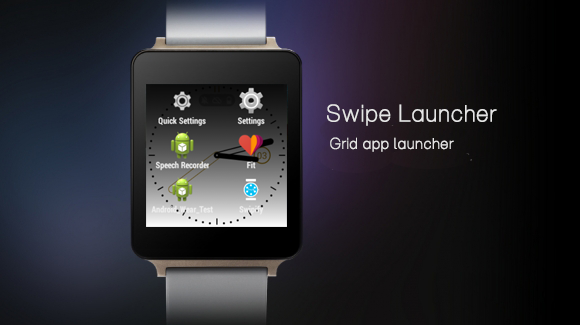
Launchers for Android Wear watch

The below launchers will be compatible with LG G watch, Moto 360 and Samsung Gear Live. However I tested in my LG G watch.

Swipify

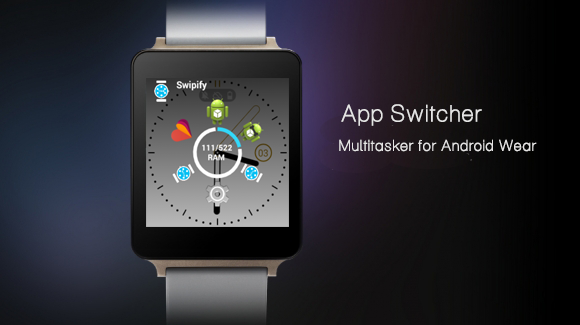
It is launcher for Android wear developed by  Sweet Pixel Studios. The new Swipify application offers four new features: App Drawer, App Switcher(multi-tasking), RAM meter and application launcher. It is still in the beta stage and it may look incomplete. It will take some time to evolve as a fully functional app.

WML (Wear My Launcher)

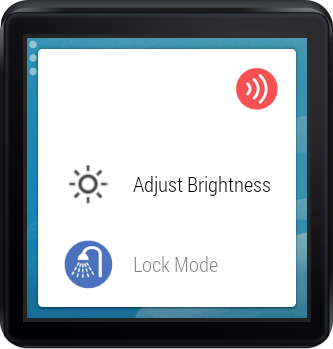
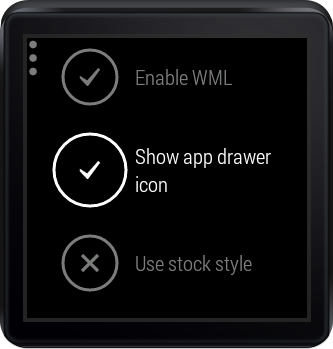
It is another excellent launcher an alternative to Wear Mini Launcher. This launcher is developed by ProCo Apps. The developer is fond of Android Wear which made them to develop and launch WML launcher on Google Play store. The UI of this app feels more likely as Google Now. With this launcher user can adjust the brightness of the watch. There is special lock which can be  unlockable only through a special action. Using this feature you can avoid children accidentally using the watch.

Wednesday, August 13, 2014

Nokia Lumia 730: phone with 5MP front camera

After the series 500, 600 and 900, it is time for Lumia 700 series to blow a breath of fresh air. Several rumors indicate that Microsoft is preparing the launch Lumia 730 and it is identified as Selfie phone. Selfie is the latest technology term which mean taking photo of their self.

 Price - $236 
Launch date - August 2014 (In Vietnam) 
*Above details are not official. 

 I got this information from Vietnamese site Zing. It seems they contacted the dealer and is ready to add in the catalogue. It is also said that commercialization was scheduled for the end of August. They also provided a complete technical specification.


Pic from: WP central

Leaked specs

Display - 4.7 inch
RAM - 1GB
Internal Storage - 8GB

Unsurprisingly, the Lumia 730 runs Windows Phone 8.1 out of the box. It  is one of the major improvement when compared to Lumia 720. The screen would be bigger and better with 4.7-inch HD (1280 x 720 pixels) resolution. It seems configuration have been upgraded and is now based on a quad-core Snapdragon 400 processor clocked at 1.2 GHz, which obviously brings the Adreno 305 for the graphics part. It has 1 GB of RAM and 8 GB of internal memory.


Selfie phone

Lumia 730 would retain the 6.7 MP rear camera of its predecessor. Microsoft want this phone to be specialist in 'Selfie'. So they have added 5 MP camer in front.

Its price has also been unveiled:5,000,000 Vietnamese Dong and is equivalent to $236.

Sunday, August 10, 2014

Windows XP not detecting Mi 3 phone when connected with USB cable - Solved

Issue:
My PC can't detect my Mi3 device when I connected with USB cable. I use Window XP.

Solution:
Just download & install MiFlash and connect your phone to the computer

Download Here

If the above link doesn't work just copy paste the below link in new tab of your browser.

http://zt.xiaomi.com/bbszt/rom/miflash/MiFlash20120723.zip

I found this driver in Xiaomi official forum. Unzip the content and install it in your PC running Windows XP. After installation restart you computer to apply changes. Then connect your phone to PC via USB cable, your phone gets detected by PC.

Saturday, August 9, 2014

BlackBerry 10.3: update coming soon

BlackBerry thinks to update its operating system for this year, the Canadian firm said in their blog. The new update 10.3 will feature virtual assistant on the new version.

The company worked on this project for a while. They announced the voice assistant for their smartphones running older version of BB. Older Version 10.2.1 already has Android files (apk) compatible and a new view on the home screen called Home Hub The home hub will collect all the notification and messages in a single view.

This new update will include a improved voice assitant. It would have a function that is enough to take on Siri and Google Now. BlackBerry 10.3 also got a feature that stores frequently used options in the settings menu for quick access.


According to the BlackBerry blog the voice assistance is in development.

BlackBerry Passport strengths lies in its screen

The Canadian firm BlackBerry, this year, came up with two new smartphones. Among them one is the Passport.

Screen of the BB Passport is perfect 

Recently, BlackBerry has surprised us with its new smartphone Passport.  This phone will carry a perfectly square screen, in 1: 1. And guess what? It is a strength, not a weakness.

Most mobile devices on the market support up to forty characters in a line.  It is convenient for a human to read upto 99 characters in a line. The new BlackBerry Passport can hold up to 66 characters in a line.  It is particularly suitable for reading text, digital books and all kinds of documents.

Voice assistant

We know the BlackBerry was among the best known and most powerful firms. To compete with established mobile OS like Android, iOS and Windows they are compelled to develop their own voice assistant. The voice assistant is known as BlackBerry wizard which will come along with Passport.

Other configuration

 It has a strong configuration which includes 3GB supported by quad-core processor, 3450 mAh battery.

Friday, August 8, 2014

Microsoft Office on Android soon?

Microsoft Office has intervened a few months back in Apple products, and may soon invade Android devices.

Many hoped to see the Office suite arrive at Google last year. Only it did not happen. Instead, it is the Apple products that have been rewarded with the essential software suite from Microsoft. Namely, among others, Word, Excel and PowerPoint.

An Office beta on Android already launched?

According to the website The Verge, the suite could soon land on Android tablets. Sources "familiar with the matter", as they say, would have said that beta testing has already started with some partners involved in the Pre-Release Program Microsoft. If you're interested, it is also possible to APPLY here .

Adapted to use a touch

Not surprisingly, Microsoft Office for Android tablet is optimized for touch screens. We would face close to the iPad version interface. If this is the case, use the finger should prove intuitive at best.

Scheduled for the end of the year

The arrival of Microsoft Office on Android would be accompanied by a significant update of iOS applications. Suffice to say that if the beta phase has started, it will not be long before everyone can enjoy. According to The Verge , the output would be set for the end of the year.

Rather incongruous, we note that the version of Office for Android tablets that precede planned for Windows 8 Indeed, the latter is expected for the beginning of the year 2015 The next version of Microsoft Office for Mac meanwhile planned for the end of the year.

HTC One (M8) Windows Phone 8 almost official

We know from last week: HTC will launch excellent HTC One (M8) in a version for Windows Phone 8.1 at an event held in New York Tuesday, August 19. The HTC One (M8) on Windows Phone 8 is almost official.

Verizon US leaked about this phone

Doubt is indeed no longer allowed after the blunder of the American operator Verizon. This major player in overseas phone let out a video of the HTC One (M8) Windows Phone 8.1 a few days ago. A leak that is sweeping the presentation of a watch connected Android Wear.

This HTC One (M8) Windows Phone 8.1 will be first available in the United States before arriving later in other countries. Although no information has yet been circulating on the subject. We hope all the same will happen quickly. Early September would be ideal in terms of strategy.

No changes to the hardware

Should we wait for the new HTC One (M8) on Windows Phone 8.1? Not really. HTC will be "satisfied" to replace Android as Windows Phone. In other words, the hardware looks identical to the phone that was released in March: Full HD 5-inch screen, Qualcomm Snapdragon processor 801 with 2 GB of RAM, storage capacity of 16 GB or 32 and no SD card support. The metal shell attracted many users and critics. All carried by a 2600 mAh battery and double ultrapixels image sensor.

Thursday, August 7, 2014

Facebook messenger for Android wear

Facebook Messenger updates and adds the Android Wear compatibility with multiple features. Recently, many applications are updated to Android Wear. After TuneIn and WhatsApp, competitor Facebook Messenger, it is the turn of the service of Mark Zuckerberg to be compatible.

The most important feature of this update is the voice dictation to respond to messages. Facebook has thought of everything, if you do not want to answer with your voice and want to show that you agree, you can send the famous thumbs-up to friends. So you can chat with your friends from your watch.

This update is a bit light because it provides fewer features and updates may arrive later to add others.

You can download the update by going here the Play Store.

Tuesday, July 29, 2014

How to flash official Kitkat ROM for Canvas A120

I am using Micromax Canvas 2 Colors A120 (4GB ROM model). Today I updated my phone to Android Kitkat 4.4. It is not official update. I manually flashed this ROM. Below is the screen shot of my updated MMX C2C A120.

 My phone became smooth after updating it to Kitkat version. I feel heating problem has been slightly reduced after the update. I am not sure because I have used only for 5 hrs. 

 Bugs after updating:

I found one major bug. My internal storage is not getting detected in my PC while connecting via USB cable. However I can see internal storage in my phone in File Manager.

The other bug is I was able to record only 720p - 3gp format video. Previously I as able to record 1080p video.

So far I was able to see detect only this bug. Soon I will share the bugs after I found it.  

 How to update to Kitkat version

You need to download the following tools first to flash Android Kitkat ROM.

  1. http://d-h.st/oef for sptools
  2. http://singledrivers.blogspot.in/2014/05/micromax-a120-canvas-2-color-usb-driver.html?m=1 for drivers
  3.  http://www.mediafire.com/download/ooke3prh5j36hde/S5501_KK_Agua_Rio_20140719_V0.0714475.zip for kitkat rom
  1. Open SP tools
  2. Click scatter loading
  3. Select the scatter file from extracted ROM folder .
  4. Then click frimware upgrade.
  5. Then remove battery on your phone .
  6. Then connect your phone via data cable .
  7. Then flashing will continue automatically
  8. Before opening SP tools you must install drivers and extract the ROM zip

Monday, July 28, 2014

Windows Phone Game: Tank invaders (RAM: 512 MB, genre: Strategy)

Tanks Invaders is voted as best mobile game in many Windows Phone gaming forums. This is a new strategy game Windows platform.

Publisher: Mgaia Studio 
Size: 48.96 MB (92.30 MB after installation) 
Price: Free 
RAM required: 512 MB minimum 
Compatibility: WP8

Here are three sentences to remember about that game: A wacky arcade game, boss fights surprising, intuitive touch-based shooting mechanics. Tanks Invaders, first developed and published by Studio Mgaia game has a simple and addictive concept. The game play? Tap cars and tanks that appear on your screen. In fact, cars (and sometimes tanks) scroll across your screen and you have to press them, and as quickly as possible. You must tap and, depending on the vehicle, a number will be set. For example, for a car, you have to press once on the screen. For a tank, twice, and so on.


When you tap the screen, you can launch a missile that destroys everything in its path. But since the game is 2D / 3D, you should not just rely on a car, stupidly. Depending on the speed of the vehicle, you must (mostly) just tap in front of it, since it takes a split second for the missile "triggers."

The game is pretty good and, even better; it also runs well on devices with 512 MB RAM. What more? The game (tested on a Nokia Lumia 520) works great on all devices, despite a little lag occasionally.

In short, Tanks Invaders is a mixing 2D / 3D game, offering a simple but original game play with unique and quirky spirit, giving access to many levels and some relaxation if you have time on your hands.

Saturday, July 26, 2014

How to remove permissions?: Android app

APK Permission Remover is an application that allows you to modify APK or applications already installed on your Android phone, to remove their rights. Indeed, there are many Android applications that require the installation much more rights than they really need.


An app can have permissions like right to make calls, right to create accounts on your phone, right change settings silently, ability to read your text messages or access the list of your contacts etc.

APK with Permission Remover and not root, you can read about the list of permissions for and remove the application of your choice. Nothing complicated, and in the end, all you need to uninstall the original application and then install the new modified to have a clean app APK. However, beware of bugs. For example, I deleted a lot of rights to the Facebook application and in the end it did not want to start. Well, okay, but you have to go by trial and error.

APK Permission Remover is available in free version and paid version. The difference is that the pro version even frees entire components in the APK. Sometimes it's more effective.

Friday, July 25, 2014

Lock screen app for Window Phone by Microsoft - Live Lock Screen BETA

Microsoft came up with new lock screen app for Windows Phone users.

App name - Live Lock Screen BETA
Size - 4 MB
Minimum RAM required - 512 MB (Runs smoother in 1 GB)
Internet connection – Not required
Compatible - Only with Windows Phone 8.1

This App is still beta so there may be a few bugs. Microsoft said that it would require 1 GB of RAM. But it can be used on Phones with 512 MB of RAM.


Features:

This new lock screen app has six different theme. By default date, time and notification will be there in all themes. The position and style of date, time and notification changes in all the themes. 

Notification from social networking such as Facebook, WhatsApp, Microsoft Exchange can be viewed from the home screen.

This app slows down the performance in Lumia phone with 512 MB RAM. In 1 GB RAM Lumia phone this app work smoothly. If you have installed more app in your phone then obviously the your phone performance become slow.

Since the size of app is just 4 MB there won't be much RAM usage by this app. It is in beta version but it is good enough. I am sure with latest updates speed of this app gets improve. 

Window Phone app to get lyrics display along with music playback

To play song along with lyrics you can use Musixmatch app. This app can play song as well show lyrics. This is a free app available in Windows Phone store. This app is supported for all Windows Phone 7.5, 8 and 8.1. Even if you are having old Windows Phone you can install this app.

App name - musiXmatch lyrics player
Size - 9 MB
Minimum RAM required - 512 MB
Languages - Deutsch, English, Español (España, alfabetización internacional), Français, Italiano
Internet connection – Required to play lyrics

App features:

With this app you can find and sync lyrics to the musictracks you are playing in your mobile. There is no charge for this service. Ithas got over 7 million popular lyrics in their database. You can access the lyrics database for free. To do this you must be online every-time.


To use this app you need an active internet connection. Without internet connection many features won't work. You can share the lyrics to Facebook/message or Email to your friends. The app uses Windows Phone theme and it looks exactly like default music player in your phone.


It has dedicated search bar for searching lyrics. You can search lyrics by providing title or artist name or even any lyrics phrase that is in your mind.

Some lyrics are not available in this app. You don’t have option to copy/paste and run the lyrics. Added this feature will be more useful. Lyrics play only if you are in online. It doesn’t work if you are in offline mode.

If you don’t have active internet connection there is not point in using this app.

Tuesday, July 22, 2014

BlackBerry Z10 vs Z3 which is the best?

BB Z10, BB Z3                                       Image Source:Zing.vn
BlackBerry recently launched its new model Z3. It was priced close to BlackBerry Z10, just Rs.1000 less than the old one. The BlackBerry Z10 was a high end mobile and during the launch it was flagship mobile. Let's look at its current price.


BlackBerry Z3 BlackBerry Z10
Rs.15990 Rs.16990
Launch:Jul 2014 Launch: Mar 2013

Specification wise best - BlackBerry Z10

BlackBerry Z10 specification in too good compared to Z3. It has 2 GB RAM, 1.5 GHz clocked processor and 8MP rear camera plus front camera. 

On the other hand Z3 has 1.5 GB RAM, 1.2 GHz clocked processor and 5 MP rear camera. 


BlackBerry Z3 BlackBerry Z10
1.5 GB RAM 2 GB RAM
1.2 GHZ CPU 1.5 GHz CPU
5 MP Camera 8 MP rear + front camera

BlackBerry Z3 has big display

BlackBerry Z3 has 5-inch display and Z10 has 4.2 inch. However Z10 has higher resolution than Z3. Even in this section Z10 is superior. Overall the only advantage of BlackBerry Z3 over Z10 is battery backup and big display. 

Verdict

I visited many BlackBerry specialist website and all of them recommend Z10 over Z3. It seems Z10 is a high end device and for the price 16,990 it is a great deal. If you are concerned more about battery life then Z3 is the best which last for 1 and half days as per the report by Firstpost.  

Sunday, July 20, 2014

How to take burst shot in Lumia 520 - Windows Phone

Brush shot feature is not available for Nokia Lumia 520. I tried this app named Blink which is good to take brust shot. Let see more about this app.

Blink download size - 3 MB
Runs in - Windows Phone 8.1 and Windows Phone 8
Price - Free
Link to download - http://goo.gl/8OVnNn

What this app can do

The primary feature of this app is to take burst photograph. It takes the photos while pressing shutter button and stops when you release it. It takes continuous photos while you are pressing shutter button. 

Blink app has face detection technology and so you face will be captured clearly. Image stabilization is good which helps you to take clear image. The chances of blur images are less due to its image stabilization technology. 

It has two modes: Blink mode and Still mode. With Blink mode you can edit the photos you took and with still mode you can capture the photo.
It can also take animated photos. It looks like flash post that you see in Google +. Animation photo is similar to the Cinmematograph app in Lumia handsets. 

Live tile has been included in this app and so the shortcut of this app look great. The Live tile of Blink will display the recently took photos. 

There is separate gallery for Blink. All the photos you caputured using Blink gets stored in My Blinks (Gallery). 

Now tutorial has been added to those who are not clear with the working. You can always refer the tutorial if you feel something as a pain area. Tutorial guides you to do all the stuff available in this app. 

Saturday, July 19, 2014

Jolla phone - My price expectation in India

Jolla phone is developed by Nokia engineers who designed Mee Go OS. You might not heard this term as this phone is not so popular. This Mee-Go OS runs in Nokia N9 and below is the Nokia phone running Mee-Go OS.

Price - Rs.13,990
Jolla phone is going to share almost the same feature available in the above shown phone. It runs Sailfish OS which is upgraded version of Mee-Go OS.

Jolla phone price

Jolla phone is already launched in European countries - Swizerland and Norway. The price of the phone is 349 Euro which is Rs.28,527 in India. I hope it is not going to be the same price in India. 


Its Specification


Color
White "The Other Half"
Display
Ample 4.5" IPS qHD display
5-point multi-touch with Gorilla 2™ Glass
Camera
8 megapixel AF camera with LED flash
2 megapixel front-facing camera
Memory
16GB storage, 1GB RAM, MicroSD slot
Talk time & battery
9 / 10 hours (GSM / 3G approx.)
User-replaceable battery
Processor
Qualcomm Dual Core 1.4GHz
Connectivity
GSM/3G/4G LTE
Design & dimensions
Height: 131 mm
Width: 68 mm
Thickness: 9.9 mm
Weight: 141 g
What's included
Jolla with The Other Half in white
EU adapter (UK adapter not included)
USB cable
Quick User Guide
Warranty leaflet


My price expectation in India

Considering the current situation, if they launch this mobile for Rs.20K I am sure many won't go for it. This phone is comparable with Motorola G, Motorola E, Mi 3, BlackBerry Z3 and Lumia 525. Comparing this phone with Nokia makers Lumia 525 seems to be fair. I want this phone to be priced Rs.7,999. They can exclude 4G feature and reduce the internal storage to 8 GB. 

Hitman Blood Money run in Core i3, 2GB RAM and needs no graphics card

I love to play third person shooter games. Hitman Blood Money is one such game. It is stealth action genre. I bought this game from Flipkart and I was excited once it started in my laptop. I thought Hitman Blood Money won't be compatible since my laptop has minimum configuration in this generation. My configuration are as follows

RAM - 2GB
Processor - Intel Core i3 (2nd Generation)

Chipset - Mobile HM77 Express
Clock speed - 2.2 GHz

It is literally a low end configuration in this generation. My laptop doesn't have graphics card.

I am posting this because I tried installing this game in my Pentium 4 desktop. It got installed  and I am not able to launch it. I know this is tad late posting about this game. But still it is one of the bestseller game and you can buy it from online store.

Hitman Blood Money game review

Maybe it was an old game but still it has good graphics more than I expected. It has many missions as you had in old Hitman games. There will be a short briefing and after that you can access weapon inventory and start the mission. The new version has adopted story version where one man will be describing about Agent 47 (Hero) to other and we will be playing the story. It just like a man describing about a skills of an underworld Don.

The story boost you to play furiously. In this game you need to complete a mission in single shot. If not the mission will start from first. Saves are allowed but they are temporary. 

Tips 

This game is very easy if you plan well. First check the map and locate the enemy. Then plan your way. Upgrade Silverballer gun and carry only this gun with you. You don't carry other weapons because you can't hide them. First upgrade in Silverballer gun is silent mode, so even if you kill your enemy other enemies won't get alert.

Look for the tension meter. If tension meter gets red then kill any enemy and use their clothes. Drag the killed enemy to a hidden place.